
 Dashboard
 Order now


A research paper title page is the first impression you make on your instructor. It tells them exactly who you are, what you are writing about, and which academic standard you are following.
The core structural components usually include the paper title, author name, institutional affiliation, course details, and sometimes a running head. Let's break down exactly how to do a cover page for a research paper step by step.
Table of contents
How to Make a Title Page for a Research Paper in 4 Steps
Creating a flawless cover page for a research paper does not have to be a guessing game. By following a systematic approach, you can format your document correctly the first time and avoid losing easy points.
Quick Tip
Always set your word processor's line spacing and font settings before you type anything. Changing these settings after typing can mess up your vertical alignment.
Step 1: Determine the Required Citation Style
Before you create a college research paper cover page, you must identify which formatting style your professor requires. There are 3 main styles:
APA (American Psychological Association)
MLA (Modern Language Association)
Chicago (CMOS).
You can almost always find this requirement in your course syllabus under the "Assignments" or "Grading" section. If the syllabus simply says "standard formatting," email your instructor immediately to clarify. Let's look at how you might identify this requirement in a real situation.
Step 2: Gather Essential Author and Institutional Information
Next, collect all the specific details you need to present on the title page of a research paper:
Paper title: the full, formal name of your research project.
Author name(s): your first name, middle initial (optional), and last name.
Institutional affiliation: the name of your university or college.
Course details: the course number and name (e.g., SOC 101: Introduction to Sociology).
Instructor name: your professor's formal title and name.
Due date: the date the assignment is due, written in the standard format for your region.
If you are working on a group project with multiple authors from the same school, list the names on one line separated by commas, with an ampersand (&) before the final name. If authors are from different institutions, you will need to use superscript numbers to connect each author to their specific school.
Below is a look at how to organize this data before formatting it.
Example: Author and Institutional Information Data
Title: The Impact of Artificial Intelligence on Urban Traffic Patterns
Author: Maria C. Gonzalez
Affiliation: Department of Urban Planning, State University
Course: URB 302: Smart Cities
Instructor: Dr. James Harrison
Date: November 14, 2023
Step 3: Format the Page Layout, Spacing, and Margins
Now, set up the blank canvas of your research paper title page so the text sits exactly where it belongs.
Margins
Set all page margins (top, bottom, left, and right) to exactly 1 inch. You can do this in Microsoft Word or Google Docs by navigating to File > Page Setup.Line spacing
Apply double-spacing throughout the entire title page. Do not add extra blank lines between the title and the author's name unless specifically instructed by the style guide.Alignment
Center all text horizontally on the page. Ensure your paragraph settings do not have any special first-line indentations applied.
Choose a highly readable, accessible font. Most formats require 12-point Times New Roman, 11-point Arial, or 11-point Calibri. Avoid decorative fonts completely. Here is how your document settings should look:
Margins: 1 inch on all sides
Font: Times New Roman, 12-point
Spacing: Double-spaced (2.0)
Alignment: Center-aligned
Step 4: Insert the Running Head and Page Numbers
Finally, you need to configure the top margin of your document, known as the header, especially in APA style.
A running head is an abbreviated version of your paper's title page that appears at the top of every page to help identify the document if pages get separated.
Double-click the very top of your document to open the header area.
Insert a page number in the top right corner using your word processor's automatic page numbering tool.
If required, type your running head in all capital letters flush left.
Ensure the header font matches the rest of your document.
A common mistake is manually typing the number "1" on the first page, which ruins the numbering on subsequent pages. Always use the "Insert Page Number" function.
Let's see how this looks in practice.
Example: Header Configuration
[Flush Left]: AI AND URBAN TRAFFIC [Flush Right]: 1
Research Paper Title Page Format and Examples by Style
While the basic elements remain similar, each academic style arranges them differently. Understanding these distinctions prevents you from losing points on technicalities.
Feature | APA (student) | MLA | Chicago |
|---|---|---|---|
Cover page required? | Yes | No (unless requested) | Yes |
Title placement | Upper half, bold | Top of first page | 1/3 down the page |
Page numbering | Top right | Top right (with last name) | No number on title page |
Avoid the following elements when formatting a cover page of a research paper:
Using bold, italics, or underlining for your title unless specific words (like a book title) require it.
Adding pictures, borders, or colorful fonts. Keep it strictly professional.
Guessing the date format. Use the format standard to your region or specific style guide.
APA Style Title Page for a Research Paper
The APA format is strictly structured and widely used in the social and behavioral sciences.
Vertical placement
Hit the "Enter" key 3 to 4 times from the top margin before typing your title.Title formatting
Type the title in bold font, using title case (capitalize major words).Spacing
Add exactly one extra double-spaced blank line between the title and the author's name.
APA 7th edition introduced distinct guidelines for students versus professionals. The student version requires course information and an instructor name, while the professional version omits these but requires an author note. APA allows several accessible fonts, including 11-point Calibri, 11-point Arial, and 12-point Times New Roman.
Student APA Cover Page Example
The student version focuses entirely on academic accountability.
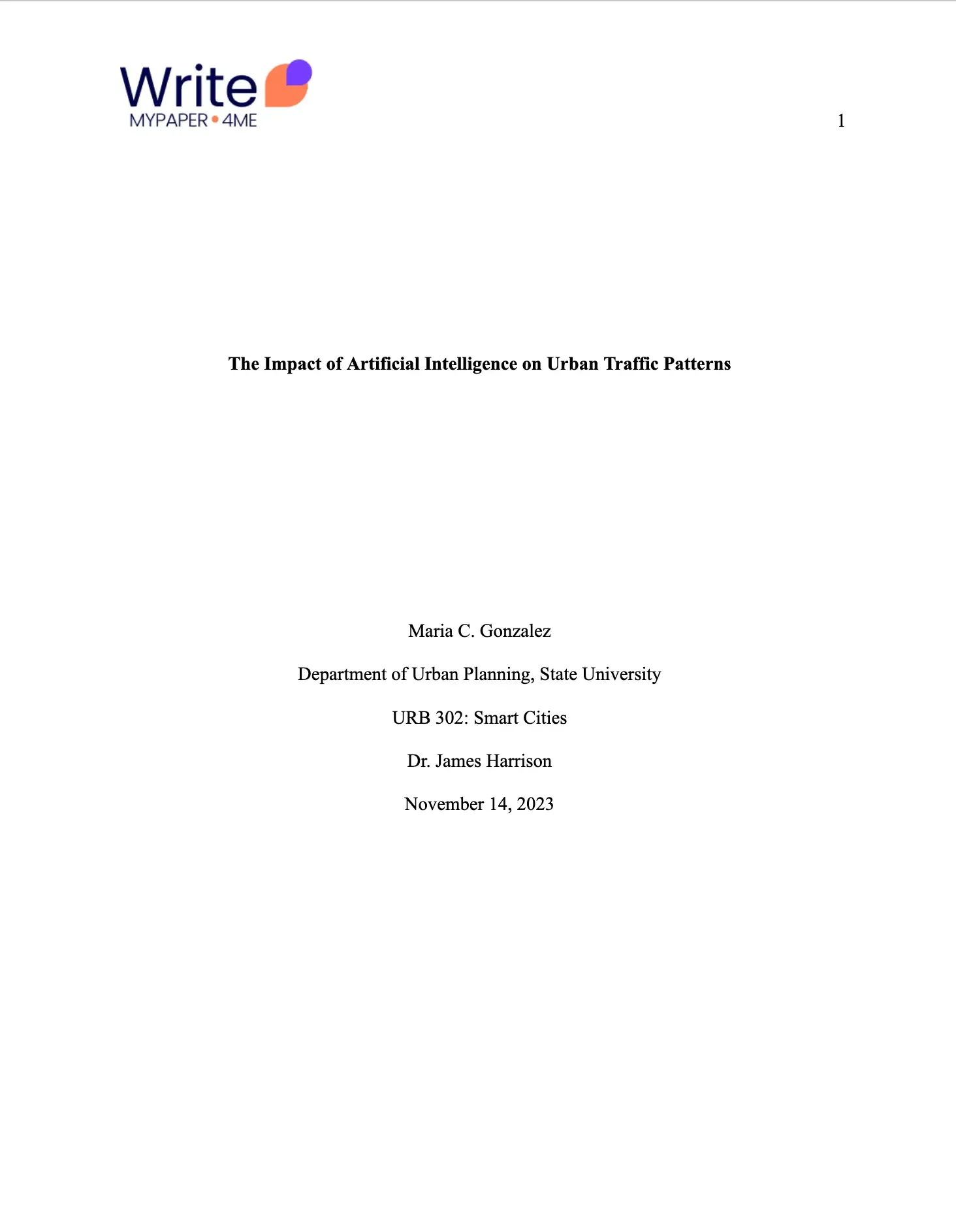
Page number (top right)
Paper title (bold)
Author name
Academic department and university name
Course number and name
Instructor name
Assignment due date.
Here's a research paper title page example in APA style.
Professional APA Cover Page Example
If you are submitting a paper for publication, you must use the professional format. Include the following details:
Running head (all caps, flush left)
Page number (Top right)
Paper title (bold)
Author name(s)
Institutional affiliation(s)
Author note
The author note is placed in the bottom half of the page. It provides ORCID identification, conflict of interest disclosures, and contact information for the author. Here is how a professional layout is structured.

MLA Style Research Paper Cover Page
In most cases, MLA style does not require a separate title page at all. Instead, you place your identifying information at the top of the very first page of your essay. However, if your instructor specifically demands a separate cover page, you must follow a standard adaptation.
Chicago Style Title Page of a Research Paper
Chicago style (Turabian) is highly structured and relies heavily on precise vertical spacing.
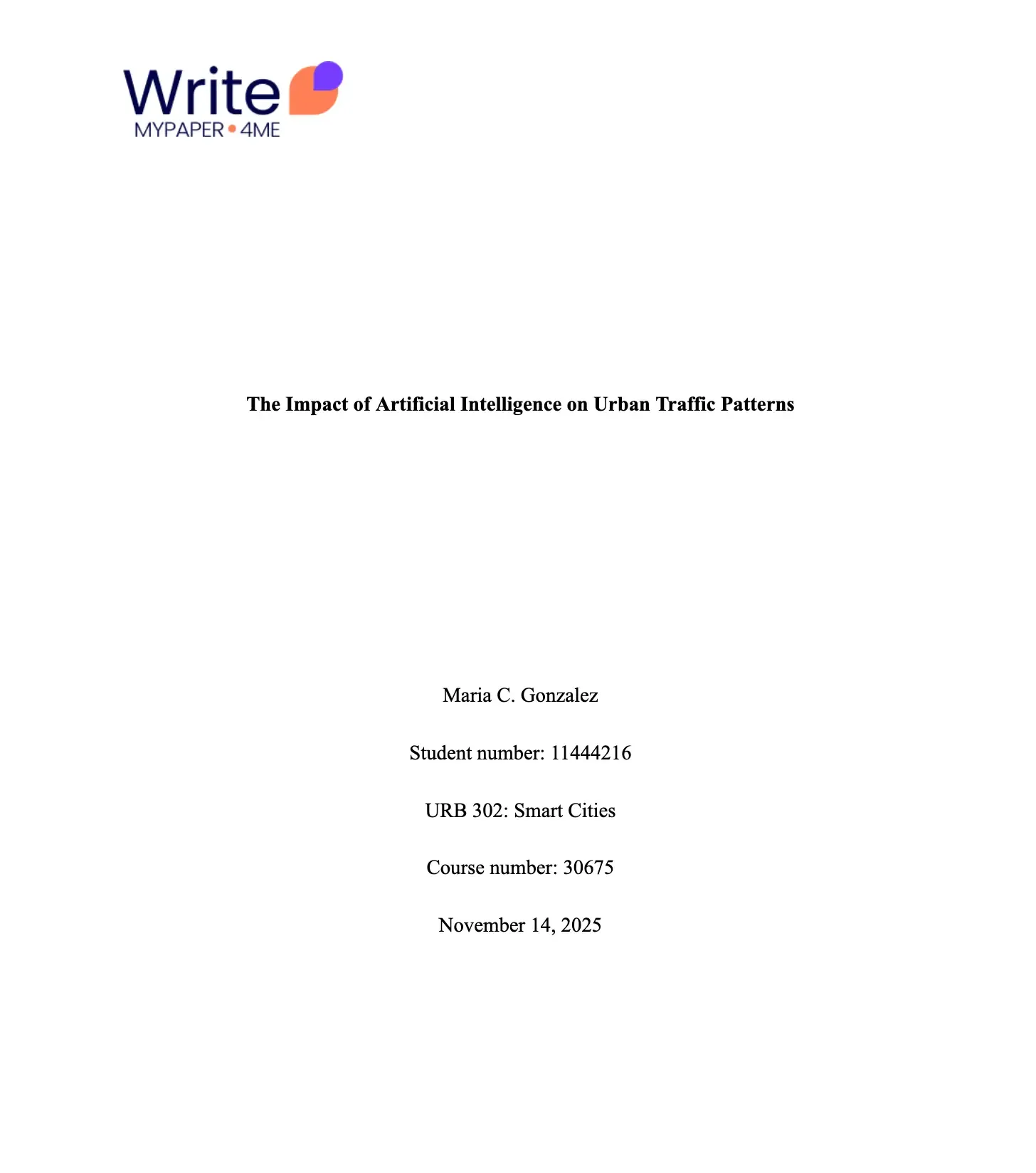
Title placement
Center the title approximately one-third of the way down the page.Author placement
Place your name, student number, course name and number, and date roughly two-thirds of the way down the page.Spacing
Leave several blank lines between the title and your identifying information.
Unlike APA, Chicago does not use bold text for the title. Furthermore, Chicago style strictly forbids putting a page number on the title page; page 1 begins on the first page of actual text. Here is an accurate research paper cover page template in Chicago style.
College Research Paper Cover Page Requirements
Beyond standardized academic styles, your specific university or department may have its own strict rules. Many institutions create custom rubrics to standardize grading across hundreds of students:
Student ID numbers
Exact word counts
Honor code pledges or academic integrity statements
Specific file naming conventions for digital submission.
Always default to your institution's rules if they conflict with standard APA or MLA guidelines.
Note
You can usually find pre-formatted, downloadable templates on your university's library website or writing center portal. Using these templates saves time and ensures compliance.
Final Thoughts on the Research Paper Title Page
A pristine research paper title page proves to your instructor that you pay attention to detail. By identifying your required style, gathering your information, and applying the correct spacing rules, you set a strong academic tone before the reader even reaches your introduction.
Quick Tip
Before submitting your paper, export it as a PDF and review the title page one last time. This ensures your formatting, margins, and spacing do not shift when your professor opens the file.